
Showtime: the email digest


You handed your phone calls to an AI agent. Every morning, the screening digest shows you exactly what it did.
The problem
You let an AI agent call and screen your candidates. The upside is obvious. The catch is trust: most AI agents are a black box. You hand over the work and hope it went fine, with no easy way to see what actually happened.
The usual answer is "go check the dashboard." Another login, another tab, one more screen competing for attention on a Monday morning. And blue-collar screening makes it worse: candidates pick up in the evening, after a shift, off site. The calls happen when the recruiter is offline. So the work stays invisible until someone opens the app and goes looking for it.
At scale, it becomes a chore and the box stays closed.
How it works
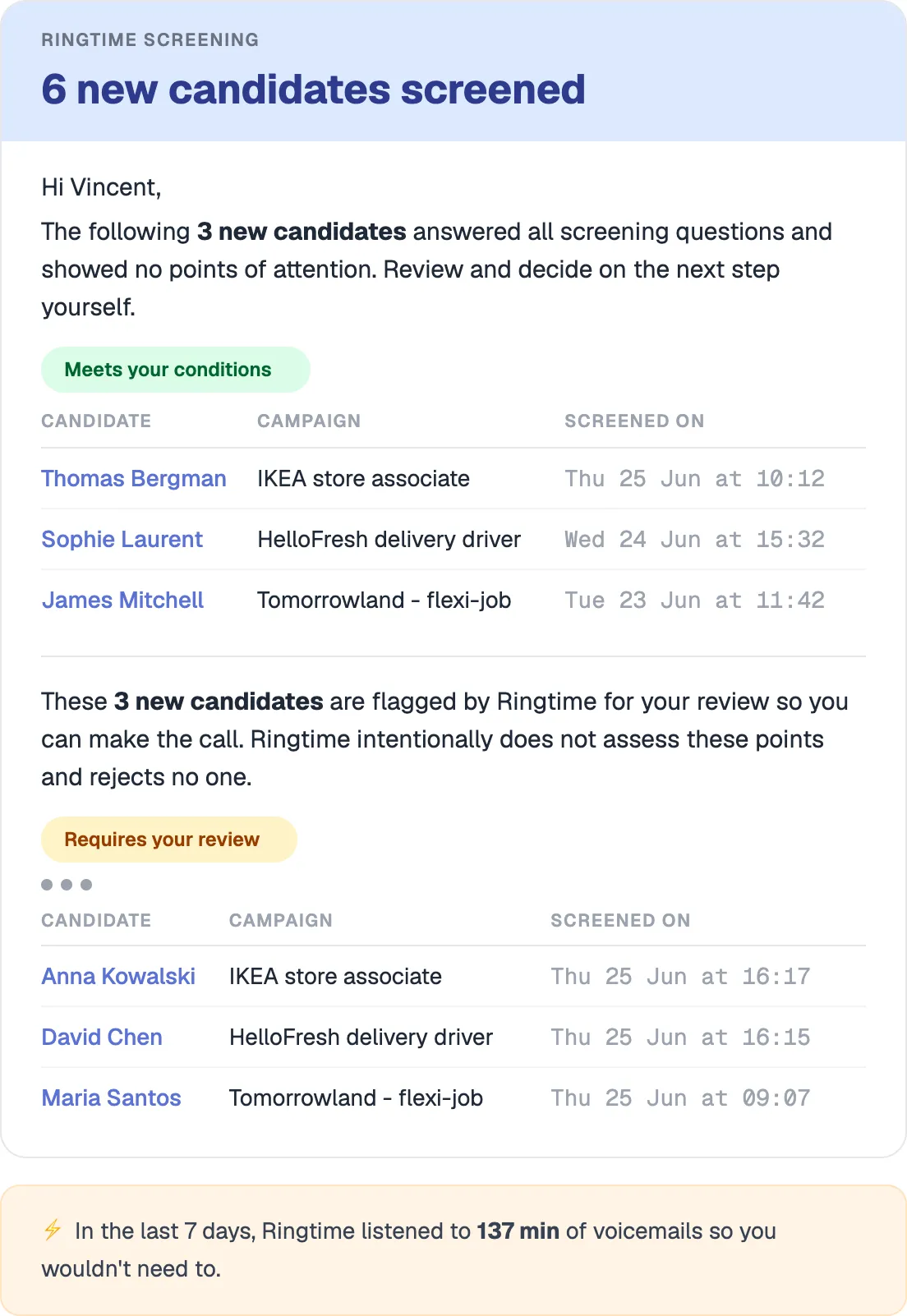
The Digest is a recap email that lands in the recruiter's inbox on a schedule.
The header tells you the number that matters: how many candidates were screened in the last 7 days. Below it, the candidates are grouped by outcome. One group meets the conditions you set and is ready for a next step. A second group is the one Ringtime deliberately does not decide on and hands to you for judgment. Each row shows the candidate, the campaign and when the screening happened.
One button takes you into the platform if you want the full picture. Outcomes are tagged the same way they are in the Interactions log: qualified, needs review, opted out, escalated. If nothing needs you, nothing does. You read the email and move on.
Why we built it this way
The real barrier to trusting an AI agent isn't whether it works. It's visibility. Will it make the calls? Can you see what it did? Usually not. So we opened the box: the outcomes the agent produced, pushed to you every morning.
And we put them in email on purpose. We watched how recruiters actually work and the day starts in the inbox. It's the first task list they triage, before anything else. A dashboard is a place you have to remember to visit. The inbox is where the work already begins. So the results show up there, not behind a login.
"But that's another email." We thought so too, until we saw that the inbox is the one screen recruiters open anyway.
The detail that matters
Look at the line at the bottom of the email:
In the last 7 days, Ringtime listened to 137 minutes of voicemails so you wouldn't need to.
It's one sentence and it's the part everyone keeps mentioning. A plain count of the hours a recruiter didn't spend on the phone this week.
The second underrated part is the group Ringtime flags for your judgment. The agent screens, but it does not reject anyone on the borderline cases. It surfaces them and asks a human to decide. That keeps a person on every real decision,and it lines up with the EU AI Act requirement that automated hiring outcomes stay reviewable. But that's almost a side effect. The practical value comes first: you see who's ready, and you see who needs your call.
From the product team
"People are nervous about handing work to an AI agent,and they're right to be. The question is never really 'will it make the calls.' It's 'can I see what it did.' The Digest is us answering that every morning, in the one place recruiters already start their day. We didn't set out to build a nicer dashboard. We built a reason to trust the box you never have to open."
Vincent Theeten, CEO
Ringtime runs when your team doesn't. The Digest is how you see what it did without opening a thing.
FAQ
What is the Ringtime Digest?
The Digest is a recap email Ringtime sends to recruiters on a schedule. It shows how many candidates were screened over the period, grouped by outcome, so recruiters can see exactly what the AI agent did without logging into a dashboard or running a report.
How do I know what the AI agent actually did?
The Digest is the record. Every screening outcome the agent produced lands in your inbox, grouped and tagged (qualified, needs review, opted out, escalated), with a link to the full interaction and recording if you want to dig deeper. It turns the agent from a black box into something you can check at a glance.
Does Ringtime reject candidates automatically?
No. Ringtime screens candidates and groups them by outcome, but borderline cases are flagged for the recruiter's judgment rather than rejected. A human makes every real decision, in line with the EU AI Act requirement that automated hiring outcomes remain reviewable.
Can I control how often I get the Digest?
Yes. Notification settings are configurable per recruiter, so the Digest arrives at the cadence that fits your team's workflow.
BLOG

.png)