
Integration in the spotlight: Microsoft Bookings

.webp)
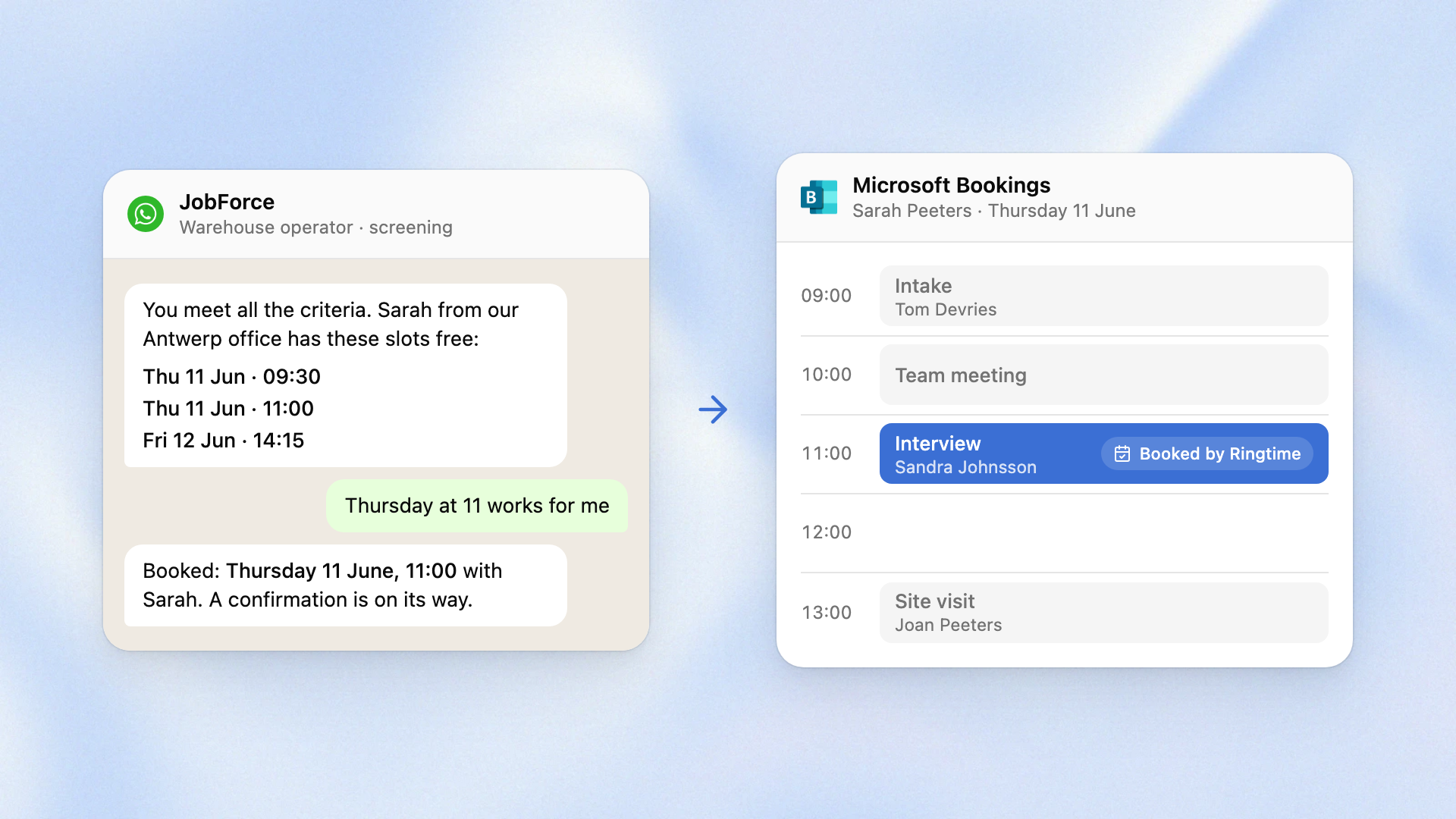
A candidate passes the screening. Ringtime offers a real open slot from your Microsoft Bookings calendar and books it before the conversation ends. The interview is in the recruiter's diary before they have seen the profile.
Microsoft Bookings is the scheduling app inside Microsoft 365. Many staffing agencies already use it to plan intakes and interviews per recruiter or per office, next to the Outlook calendars their teams already use. Ringtime runs on top of it, so Bookings keeps every appointment.
What it does
Ringtime screens the candidate on phone and WhatsApp, in their own language. When the candidate meets the criteria you set for the vacancy, the agent reads the availability in Bookings and offers open slots there and then. The candidate picks one and the appointment is booked before the conversation ends. That is interview scheduling inside the screening conversation.
The booking goes to the right person. Ringtime books with the recruiter who added the candidate to the campaign or with the office service when your agency plans per office. The appointment lands in Bookings, which syncs it to the recruiter's Outlook calendar.
The candidate gets one confirmation, from Ringtime. The booking also travels back to your ATS with the rest of the screening result.
Why it matters
- No new tool. Bookings stays your scheduling system and Outlook stays your recruiters' calendar. Nobody learns a new app and nobody copies a time from one window into another.
- Your calendar stays yours. Ringtime only books into the services and staff you nominate and only into slots Bookings shows as free. Existing appointments are never moved.
- Evidence, never a verdict. A booked slot means the candidate passed the screening you defined. The recruiter still meets the candidate and makes the call, which is what the EU AI Act asks of a screening tool.
For the technical team
Ringtime connects to your Microsoft 365 tenant once, after a Microsoft 365 admin grants consent. Your Bookings admin then sets up the services. Every staff member accepts the Bookings invite with the same email address they use in Ringtime. Your team gets a technical brief covering the routing per recruiter or per office, the slot rules and the failure modes. Ringtime books the same way into Google Calendar and Outlook. It writes the result back to Carerix and Connexys.
FAQ
Does Ringtime integrate with Microsoft Bookings?
Yes. After a candidate passes the screening, the Ringtime agent reads the open slots in Microsoft Bookings. It offers them to the candidate on phone or WhatsApp and books the chosen slot during the same conversation. The booking goes to the recruiter or the office service you set up in Bookings.
Can you use Microsoft Bookings for interview scheduling?
Yes. Many recruitment teams publish a Bookings page per recruiter or per office and send the link to candidates. With Ringtime, the candidate does not need the link: the agent books the interview in Bookings at the end of the screening call or WhatsApp chat.
Is Microsoft Bookings part of Microsoft 365?
Yes. Microsoft Bookings is the scheduling app in Microsoft 365. It is included in plans such as Microsoft 365 Business Basic, Business Standard, Business Premium, E3 and E5. Bookings syncs with Outlook, so recruiters see their booked interviews in the calendar they already use.
Will the candidate get two confirmation emails?
No. The candidate receives one confirmation, from Ringtime.
What does our IT team need to do?
A Microsoft 365 admin grants consent for the Ringtime connection once. Your Bookings admin sets up the services and makes sure every recruiter has accepted their Bookings invite. Ringtime handles the rest of the setup with you.
BLOG